We audit a lot of small business websites. Some are brand new. Some are five years old. Some cost £500, some cost £8,000. And across all of them — regardless of age, price, or industry — we see the same mistakes appearing again and again.
What makes them particularly painful is that they are invisible to the business owner. The site looks fine. It loads. The phone number is there. But Google does not find it, visitors arrive confused, and the enquiry form goes quiet week after week.
This guide names them plainly, explains exactly why each one costs you business, and tells you what to do about it.
of mobile users abandon a website that takes longer than 3 seconds to load.
conversion drop for every additional second of mobile page load time.
of UK small businesses still operate without any website presence in 2026.
In This Auditing Guide:
Your Site Loads Too Slowly on Mobile
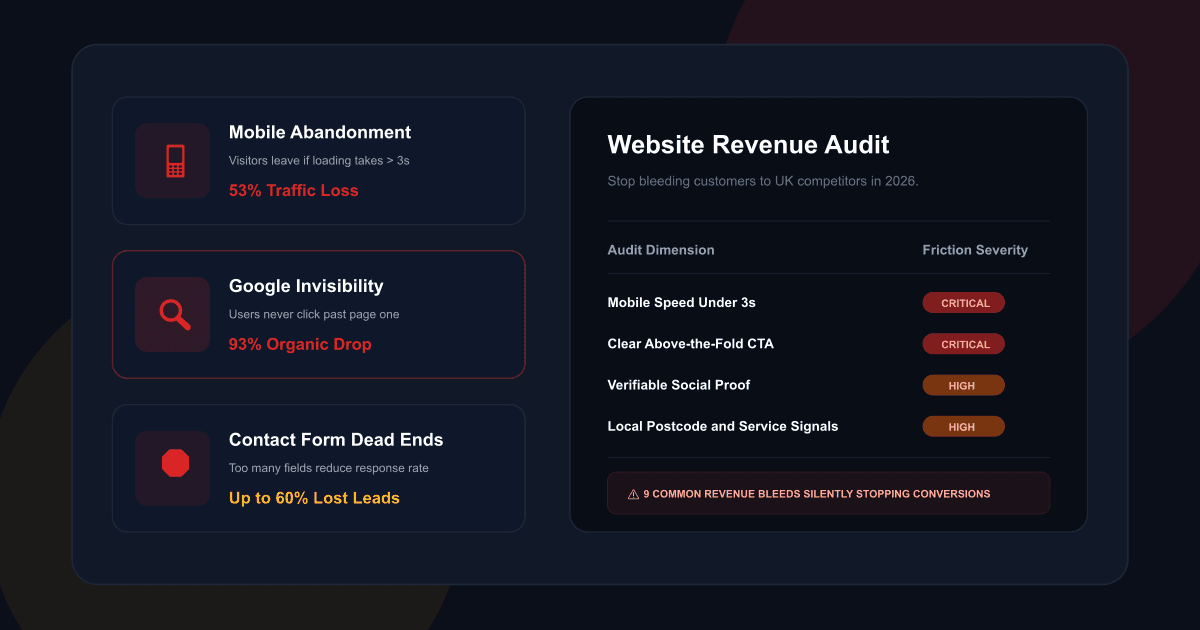
This is the mistake with the most direct, measurable revenue impact — and it is staggeringly common. More than half of all UK website traffic comes from mobile devices, and mobile pages on average still take far too long to load.
The math is brutal. If your site takes 5 seconds to load on mobile — completely normal for an unoptimised WordPress site — you have likely lost over half your visitors before they have read a single word. E-commerce sites loading in one second convert three times higher than those taking five seconds.
The usual culprits are uncompressed images (the single biggest offender), too many plugins adding JavaScript to every page, cheap shared hosting with slow server response times, and no content delivery network (CDN) to serve files from a location near the visitor.
Run your site through Google PageSpeed Insights (free). Anything under 50 on mobile needs urgent attention. Compress all images to WebP format, eliminate unused plugins, upgrade to a managed host, or move to a modern Next.js deployment. A well-built Next.js site achieves 90–100 on mobile PageSpeed as a baseline.
No Clear Call to Action Above the Fold
The section of your website visible without scrolling — "above the fold" on desktop, roughly the first screen-height on mobile — is the most valuable real estate your business owns online. Most small business websites waste it entirely.
Typically, they show a vague hero image, a tagline that says something like "Quality Service You Can Trust," and a phone number in the top corner. What they do not show is an immediate, obvious answer to the question every visitor has the moment they arrive: what do you do, is it for me, and what should I do next?
Visitors make decisions within seconds. If the value proposition is not immediately clear and the next step is not immediately obvious, they leave. Changing a button from "Schedule Now" to "Book Today" has generated a 37.5% jump in conversions in healthcare sites — the specificity of the action matters enormously.
Your above-fold section needs three things: a headline that names what you do and who for (specific, not generic), a single high-contrast "Book" or "Get a Quote" or "Contact Us" button, and one trust signal immediately beneath it ("200+ Google reviews • Based in London • Same-week availability"). Remove everything else.
Google Cannot Find You for Anything Relevant
Organic search is still one of the highest-converting traffic sources available to a small business. A potential customer who finds you through a Google search for exactly what you offer is already warm — they need what you have, right now. But the vast majority of small business websites are invisible to Google for any search query their potential customers are actually using.
Did you know? 93% of customers won't go past page one of Google results. If you are not there, you effectively do not exist online for those searches.
The reason is almost always the same: the site was built without any SEO consideration. No keyword research informed the page content. Service pages don't contain the phrases customers search for. The meta titles are either blank or auto-generated garbage like "Home | My Business."
Start with Google Search Console (free) — it shows whether Google indexes your pages and which searches bring up your site. Do basic keyword research using free tools like Google's "People also ask" or Ubersuggest. Rewrite your service copy to include the exact phrases customers search for. Set meta titles as: "[Service] in [Location] | [Business Name]".
No Trust Signals — Asking Strangers to Believe You
Before calling or emailing, web visitors look for evidence that you are real, competent, and safe to deal with. They look for reviews, check for a physical address, notice professional styling, and seek out industry accreditations or qualifications.
UK consumers have grown measurably more sceptical. Generic stock photography, vague "best in the business" claims, and anonymous contact forms trigger immediate distrust. The businesses winning online are the ones that show their faces, name their credentials, and let previous customers speak for them.
Add Google Reviews to your homepage — even 8–10 reviews with real first names and specific comments is dramatically better than nothing. Add a photo of yourself or your team. List your qualifications, accreditations, and professional memberships visibly. Include a physical address or minimum service area. Trust is built from specific, verifiable details — not vague marketing language.
"The businesses capturing market share right now are not necessarily the ones with the newest websites. They are the ones whose websites do the actual work of building trust and answering questions before the first phone call."
Your Contact Form Is a Dead End
This one is quietly responsible for losing a significant number of enquiries every month. Someone lands on your site, decides you seem like the right fit, navigates to your Contact page — and finds a form with eight fields asking for excessive information. Or worse: a form that does not work, submits to a broken email address, or sends the message straight to spam.
Long forms destroy conversion. Every additional field reduces completion rate. For first contact, three fields is the target maximum: name, email, and a brief description of what they need. You can ask for more detail once the conversation has started.
Reduce your contact form to three fields. Test it yourself — submit a dummy enquiry and check where it routes. Set up real-time email notifications to your phone. Add an immediate auto-response so leads know you have received their message. Respond to every enquiry within two hours during business hours — response speed is a massive conversion multiplier.
Everything Is a Service, Nothing Is a Solution
Most small business websites describe what the business does. Very few describe what the customer gets. This is not a trivial distinction — it is the difference between a website that informs and a website that converts.
Consider two ways of describing the same service:
"We offer a comprehensive range of accountancy services including bookkeeping, VAT returns, payroll, and year-end accounts."
"Never worry about HMRC again. We handle your books, VAT, and year-end accounts so you can focus on running your business — with a dedicated accountant who actually answers the phone."
Both describe identical services. Version B sells the outcome and eliminates the anxiety. Visitors do not buy services — they buy solutions to problems and relief from frustrations.
For every service you list, ask: "What does my customer want to be true after using this?" Write to that outcome, not the process. Lead with the result, then explain the mechanism. Use "you" and "your" more than "we" and "our" — the ratio on most small business websites is completely backwards.
Designed for Desktop, Not for Real-World Mobile Use
In 2026, the majority of UK local business searches happen on mobile. Someone has a problem, they open Google on their phone, and they find your website. What they experience in the next five seconds determines whether they become a customer.
A responsive website — one that technically "works" on mobile — is not the same as a mobile-first website. Responsive just means the layout does not break. Mobile-first means the entire experience has been designed with a thumb on a small screen as the primary interaction model: large tap targets, phone numbers that dial on tap, a booking button that stays visible as you scroll, text that does not require zooming, and a load time under three seconds.
Open your website on your own phone right now — on a standard mobile data connection. Try to call the phone number, fill in the contact form, and navigate between pages. Whatever frustrates you will frustrate your customers. If the phone number is not a tap-to-call link, fix it immediately. That is free and takes five minutes.
No Location Signals — Invisible in Local Search
The most commercially valuable searches for most UK small businesses are hyper-local: "plumber in Islington," "accountant near me," "physio Shoreditch." These searches have high intent — the person is ready to book, often today.
Google's local ranking algorithm uses three factors: relevance (does your business match the search?), distance (how close are you?), and prominence (how well-known and trusted is your business?). If your site never mentions the specific areas you serve, does not have your full address and postcode, and has no local-specific content, you are leaving these searches to competitors.
Add your full business address with postcode to your website footer and Contact page. Add LocalBusiness JSON-LD schema markup to your homepage — it tells Google exactly who and where you are. Claim your Google Business Profile and keep it updated. Mention your specific service areas naturally: "serving clients across North London, including Islington, Hackney, and Camden."
You Built It Once and Never Touched It Again
A website launched and forgotten is a website in slow decline. Google rewards freshness and signals ongoing activity — a site with no new content, unchanged metadata, and accumulating broken links slowly drifts down search rankings as active competitors overtake it.
This is compounded on WordPress by security risks: an unpatched WordPress installation, with outdated plugins and themes, is a magnet for hacking. Over 11,000 vulnerabilities were discovered in the WordPress ecosystem in 2025 alone. A hacked website — one that starts serving spam, gets blacklisted by Google, or simply goes offline — can destroy months of SEO progress in days.
Schedule a 30-minute website review every quarter. Update your team page, check that all phone numbers and addresses are current, and scan for broken links. If on WordPress, ensure auto-updates are enabled. Alternatively, move to a high-performance, low-maintenance platform like Next.js, which has no plugin ecosystem to keep updating and patching.
Your 5-Minute Website Self-Audit
Work through this checklist now. Each check takes under a minute and directly maps to the highest-impact revenue leaks discussed above.
| Check | How to test it | Impact if failing |
|---|---|---|
| Mobile load time | pagespeed.web.dev — test homepage on mobile | Critical — losing 50%+ of mobile visitors |
| Visible CTA above fold | Open homepage on mobile without scrolling | Critical — visitors don't know what to do |
| Google indexing | Type "site:yourdomain.co.uk" in Google | Critical — completely invisible in search |
| Tap-to-call phone | Tap phone number on mobile — does it dial? | High — massive friction on hot leads |
| Trust signals present | Are reviews, accreditations, or team photos visible? | High — visitors have no reason to trust you |
| Contact form works | Submit a test enquiry from your own contact form | Critical — you are losing leads silently |
| Address in footer | Is your full postcode visible in the footer? | Medium — weakens critical local SEO signal |
| Last content update | When was the last page, post, or case study published? | Medium — ranking decay, declining authority |
If you scored 3 or more "failing" checks: your website is actively bleeding enquiries right now. Some fixes are free and immediate (such as updating to a tap-to-call link, or reducing form fields). Others require structural changes. But the sooner they are addressed, the sooner you stop losing customers to better-optimised competitors.
We'll Audit Your Website Live — For Free
Book a 30-minute screen-share and we'll go through your website together — checking every item on the list above, running your PageSpeed scores, and telling you exactly what's costing you enquiries. No obligation, no sales pitch.
AMK Coding • Brighton-based, serving London & the UK • Next.js & WordPress specialists • Fixed-price proposals
Sources & Auditing Standards
- Google Lighthouse & PageSpeed Insights — Official tool for checking performance benchmarks, accessibility scores, and best practices.
- Google Search Central Documentation — Authoritative guidelines on canonical tags, mobile-first indexing, and crawling strategies.
- BrightLocal — Research findings regarding client trust, business citation consistency, and reviews impact.
- WebAIM — Web accessibility evaluation and WCAG compliance benchmarks.