Every SaaS developer at some point searches “how to add Stripe subscriptions to Next.js” and finds the official Stripe docs or a quick tutorial. They follow along, the checkout works, they ship it — and they've just introduced three or four security vulnerabilities into their billing system.
This guide covers the complete integration from a security-first perspective. Every step explains not just what to do, but why — so you understand the attack vectors you're defending against, not just the code that defends against them. We'll cover setup, checkout session creation, the customer portal, and route protection. But the section that matters most — and where most implementations go wrong — is webhooks. If you're building a custom product, you can also explore our professional Next.js Web Application services to have our team build a production-grade, secure SaaS setup for you.
In This Security Guide:
Architecture First: What Runs Where
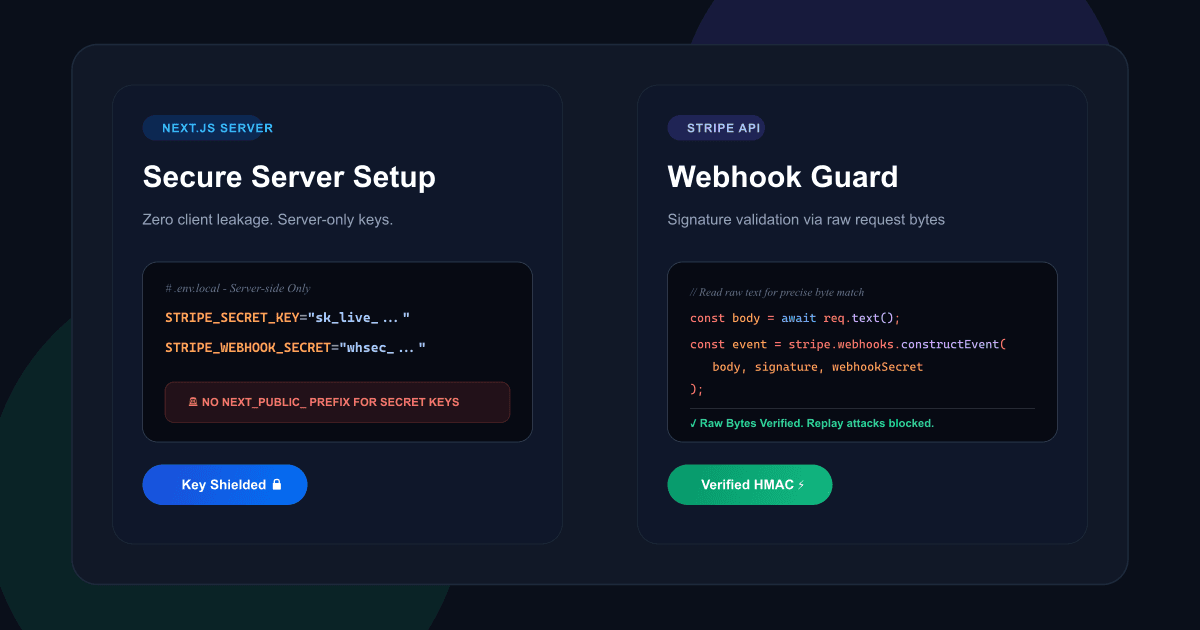
Before writing a line of code, understand this constraint: your Stripe secret key must never touch the client. Not in a component. Not in a hook. Not in an environment variable prefixed with NEXT_PUBLIC_. Never.
The reason is simple. NEXT_PUBLIC_ variables are bundled into your JavaScript and sent to every browser that loads your app. If your secret key is in that bundle, it is publicly accessible and your Stripe account is compromised.
Every Stripe API call happens on the server. The browser only ever sees your publishable key (safe to expose) and the redirect URLs that Stripe sends it to. Your secret key, webhook secret, and subscription data never leave your server.
Environment Variables and Key Rotation Strategy
Create a .env.local file at the root of your project. This file is automatically excluded from git by Next.js — but verify .env.local is in your .gitignore before committing. One accidental commit of a secret key requires full key rotation, which means updating every deployment, every webhook endpoint, and potentially notifying Stripe of the exposure.
# Stripe API Keys — NEVER prefix secret key with NEXT_PUBLIC_
STRIPE_SECRET_KEY="sk_test_51..."
NEXT_PUBLIC_STRIPE_PUBLISHABLE_KEY="pk_test_51..."

# Webhook signing secret — different for test and live mode
STRIPE_WEBHOOK_SECRET="whsec_..."

# Your app's base URL (used in redirect URLs)
NEXT_PUBLIC_APP_URL="http://localhost:3000"
whsec_test_...) and live-mode webhook secret are completely different values. Using the wrong one in production is the #1 cause of webhook signature verification failures. Set separate environment variables in your deployment platform for test vs. live environments.In production, set these variables in your hosting platform's environment configuration (Vercel dashboard, Railway, etc.) — never in a committed .env file. Rotate your secret key immediately if you ever suspect exposure.
Initialise the Stripe SDK — Server-Side Only
Create a single shared Stripe instance in /lib/stripe.ts. Centralising the SDK configuration ensures you pin a specific API version and only instantiate Stripe once. Only ever import this file in server-side code — Route Handlers, Server Actions, and Server Components. If you import it in a client component, your secret key will be bundled into the client JavaScript.
import Stripe from 'stripe';

// Pin to a specific API version — review Stripe changelog before upgrading
export const stripe = new Stripe(process.env.STRIPE_SECRET_KEY!, {
  apiVersion: '2026-01-28',
  typescript: true,
});

// ONLY import this file in: Route Handlers, Server Actions, Server Components
// NEVER import in: 'use client' components, hooks, or pages router _app.tsxCreate a Stripe Customer on Sign-Up
Every user who might subscribe should have a corresponding Stripe Customer object. Create this server-side at sign-up and persist the customer.id in your database against the user record. This is the link between your user system and Stripe's billing system — every subsequent checkout session, subscription, and invoice will reference this ID.
import { stripe } from '@/lib/stripe';
import { db } from '@/lib/db';

export async function createStripeCustomer(
  userId: string,
  email: string,
  name: string
) {
  const customer = await stripe.customers.create({
    email,
    name,
    metadata: { userId },  // Links Stripe customer back to your user ID
  });

  // Persist the Stripe customer ID in your database
  await db.user.update({
    where: { id: userId },
    data: { stripeCustomerId: customer.id },
  });

  return customer.id;
}
The metadata.userId is critical — it lets you identify which user triggered a webhook event when Stripe sends you a customer-related event. Always pass your internal user ID as metadata when creating Stripe objects.
Build the Checkout Session — Price IDs, Not Amounts
This is where one of the most common and most costly security mistakes happens. Developers accept a price amount from the client-side (a form POST, a query parameter, a React state value) and pass it directly to the checkout session. This is exploitable: a user can modify that value in their browser's developer tools or intercept the request, and pay any amount they choose.
priceId string from the client — then validate it against a server-side allowlist of your known price IDs before using it.“pro” or “starter”). Server maps that to a Price ID from an environment variable or constants file. The amount is never sent by the client.import { NextRequest, NextResponse } from 'next/server';
import { stripe } from '@/lib/stripe';
import { getServerSession } from '@/lib/auth';
import { db } from '@/lib/db';
// Server-side price ID mapping — client never sees amounts
const PRICE_IDS: Record<string, string> = {
starter_monthly: process.env.STRIPE_PRICE_STARTER_MONTHLY!,
pro_monthly: process.env.STRIPE_PRICE_PRO_MONTHLY!,
pro_annual: process.env.STRIPE_PRICE_PRO_ANNUAL!,
};
export async function POST(req: NextRequest) {
const session = await getServerSession();
if (!session?.user) {
return NextResponse.json({ error: 'Unauthorised' }, { status: 401 });
}
const { planKey } = await req.json();
// Validate planKey against known values — reject anything unexpected
const priceId = PRICE_IDS[planKey];
if (!priceId) {
return NextResponse.json({ error: 'Invalid plan' }, { status: 400 });
}
// Fetch the Stripe customer ID from your database
const user = await db.user.findUnique({ where: { id: session.user.id } });
const checkoutSession = await stripe.checkout.sessions.create({
mode: 'subscription',
customer: user?.stripeCustomerId, // Re-use existing Stripe customer
line_items: [{ price: priceId, quantity: 1 }],
success_url: `${process.env.NEXT_PUBLIC_APP_URL}/dashboard?upgraded=true`,
cancel_url: `${process.env.NEXT_PUBLIC_APP_URL}/pricing`,
metadata: { userId: session.user.id },
allow_promotion_codes: true,
});
return NextResponse.json({ url: checkoutSession.url });
}success_url. Never use this redirect as confirmation that payment succeeded — it can be faked by navigating directly to the URL. Grant access only after confirming payment via a webhook event.Webhooks — The Part Everyone Gets Wrong
Webhooks are how Stripe tells your application that something happened: a payment succeeded, a subscription was cancelled, a card was declined. They are not optional — they are the only reliable mechanism for keeping your application state in sync with Stripe's billing state. And they are where the majority of Stripe integrations have a critical security gap.
The raw body problem
Stripe signs every webhook payload using your webhook secret. To verify the signature, it computes an HMAC hash over the exact raw bytes it sent. If you call request.json() before verifying the signature, Next.js parses the JSON — which can alter whitespace, newline characters, and key ordering. The byte sequence changes. The signature no longer matches. Either your signature verification silently fails (and you accept unverified events), or it throws an error and you start missing events entirely.
request.text(), not request.json(), when reading the body in your webhook Route Handler. The raw string is what Stripe signed. Parse it as JSON only after the signature is verified.import { NextRequest } from 'next/server';
import { headers } from 'next/headers';
import Stripe from 'stripe';
import { stripe } from '@/lib/stripe';
import { db } from '@/lib/db';
export async function POST(req: NextRequest) {
// ✓ Read as raw text — NEVER call req.json() here
const body = await req.text();
const signature = (await headers()).get('stripe-signature');
if (!signature) {
return new Response('Missing stripe-signature header', { status: 400 });
}
let event: Stripe.Event;
try {
// constructEvent verifies the signature against the raw body
event = stripe.webhooks.constructEvent(
body,
signature,
process.env.STRIPE_WEBHOOK_SECRET!
);
} catch (err: any) {
// Log the error but return 400 — do NOT process unverified events
console.error('Webhook signature verification failed:', err.message);
return new Response(`Webhook error: ${err.message}`, { status: 400 });
}
// Signature verified — safe to process the event
try {
await handleWebhookEvent(event);
} catch (err) {
// Return 500 so Stripe retries the delivery
console.error('Webhook handler error:', err);
return new Response('Internal error', { status: 500 });
}
return new Response(null, { status: 200 });
}
async function handleWebhookEvent(event: Stripe.Event) {
switch (event.type) {
case 'checkout.session.completed': {
const session = event.data.object as Stripe.Checkout.Session;
if (session.mode === 'subscription' && session.subscription) {
await db.user.update({
where: { id: session.metadata!.userId },
data: {
subscriptionId: session.subscription as string,
subscriptionStatus: 'active',
},
});
}
break;
}
case 'customer.subscription.updated': {
const sub = event.data.object as Stripe.Subscription;
await db.user.updateMany({
where: { subscriptionId: sub.id },
data: { subscriptionStatus: sub.status },
});
break;
}
case 'customer.subscription.deleted': {
const sub = event.data.object as Stripe.Subscription;
await db.user.updateMany({
where: { subscriptionId: sub.id },
data: { subscriptionStatus: 'cancelled' },
});
break;
}
case 'invoice.payment_failed': {
const invoice = event.data.object as Stripe.Invoice;
// Notify user, trigger dunning email, update billing status
console.log(`Payment failed for customer: ${invoice.customer}`);
break;
}
default:
// Silently ignore events we don't handle
}
}Essential Webhook Events for Subscriptions
| Event | When it fires | What to do | Priority |
|---|---|---|---|
| checkout.session.completed | User completes checkout | Grant access, store subscription ID | Essential |
| customer.subscription.updated | Plan change, renewal, trial end | Sync subscription status and plan tier | Essential |
| customer.subscription.deleted | Subscription cancelled | Revoke access, update status to cancelled | Essential |
| invoice.payment_failed | Card declined on renewal | Notify user, begin dunning recovery | Essential |
| invoice.payment_succeeded | Successful recurring charge | Audit log, renewal confirmation email | Recommended |
| customer.subscription.trial_will_end | 3 days before trial ends | Send trial expiry reminder email | Recommended |
The Customer Portal — Zero UI, Full Self-Service
Stripe's Customer Portal is one of the most underused features in SaaS billing. It is a hosted, Stripe-branded dashboard where your subscribers can cancel, upgrade, downgrade, update payment methods, and download invoices — without you building a single piece of billing UI.
You configure it once in the Stripe Dashboard (Settings → Billing → Customer Portal), then generate a short-lived session URL when a user clicks “Manage Billing” in your app.
import { NextRequest, NextResponse } from 'next/server';
import { stripe } from '@/lib/stripe';
import { getServerSession } from '@/lib/auth';
import { db } from '@/lib/db';

export async function POST(req: NextRequest) {
  const session = await getServerSession();
  if (!session?.user) {
    return NextResponse.json({ error: 'Unauthorised' }, { status: 401 });
  }

  const user = await db.user.findUnique({ where: { id: session.user.id } });

  if (!user?.stripeCustomerId) {
    return NextResponse.json({ error: 'No billing account found' }, { status: 404 });
  }

  const portalSession = await stripe.billingPortal.sessions.create({
    customer:   user.stripeCustomerId,
    return_url: `${process.env.NEXT_PUBLIC_APP_URL}/dashboard`,
  });

  // Redirect directly to the portal URL
  return NextResponse.redirect(portalSession.url);
}
When a user's subscription status changes in the portal (upgrade, cancel, payment method update), Stripe fires the appropriate webhook events to your endpoint, which update your database. When they return to your app via the return_url, their subscription status reflects the change.
Protecting Routes Based on Subscription Status
The last critical security requirement: your application must enforce subscription-gated access on the server. Not in a React component. Not in a client-side hook. On the server — where it cannot be bypassed.
Any access control enforced only on the client is not access control. A user who opens browser developer tools and modifies the client-side state, or navigates directly to a protected URL, will bypass it entirely.
Server-Side Middleware Protection
import { NextRequest, NextResponse } from 'next/server';
import { getSessionFromCookie } from '@/lib/auth';
import { db } from '@/lib/db';

export async function middleware(req: NextRequest) {
  // Only run on protected routes
  if (!req.nextUrl.pathname.startsWith('/dashboard')) {
    return NextResponse.next();
  }

  const session = await getSessionFromCookie(req);
  if (!session) {
    return NextResponse.redirect(new URL('/login', req.url));
  }

  // Check subscription status from DB — never from client state
  const user = await db.user.findUnique({
    where:  { id: session.userId },
    select: { subscriptionStatus: true },
  });

  if (user?.subscriptionStatus !== 'active') {
    return NextResponse.redirect(new URL('/pricing', req.url));
  }

  return NextResponse.next();
}

export const config = {
  matcher: ['/dashboard/:path*', '/app/:path*'],
};Testing Checklist Before Going Live
Test thoroughly in Stripe test mode before flipping to live. The Stripe CLI makes this straightforward — it can forward live webhook events to your local development server, so you can test the full end-to-end flow without deploying.
🔧 Local Testing
- ✓
Install Stripe CLI:
stripe login - ✓
Forward webhooks:
stripe listen --forward-to localhost:3000/api/webhooks/stripe - ✓
Trigger test events:
stripe trigger checkout.session.completed - ✓
Confirm webhook secret matches CLI output
💳 Test Cards
- ✓
4242 4242 4242 4242— Successful payment - ✓
4000 0025 0000 3155— 3D Secure Verification - ✓
4000 0000 0000 9995— Card declined - ✓
4000 0000 0000 0341— Attaches but fails on charge
🔒 Security Checks
- ✓
Confirm
STRIPE_SECRET_KEYis not in the client bundle - ✓
Verify webhook signature before any DB writes
- ✓
Try accessing
/dashboardwithout active subscription - ✓
Confirm success URL redirect doesn't grant access directly
🚀 Pre-Launch
- ✓
Swap test keys for live keys in production env vars
- ✓
Register webhook endpoint in live Stripe Dashboard
- ✓
Configure Customer Portal settings in live mode
- ✓
Enable
invoice.payment_failedevent trigger
Building a SaaS and Need This Done Right?
We build Next.js SaaS platforms with production-grade Stripe billing — subscriptions, usage-based billing, multi-seat, and beyond. Tell us what you're building and we'll scope it in a 30-minute call.
AMK Coding · Next.js & Stripe specialists · Brighton-based, serving London & the UK
Frequently Asked Questions
Why does my Stripe webhook signature verification keep failing?+
Should I use Stripe Price IDs or amounts in my checkout session?+
How do I protect pages in Next.js based on subscription status?+
What Stripe webhook events do I need to handle for subscriptions?+
Do I need to handle idempotency in my webhook handler?+
Sources & Technical References
- Stripe Security & PCI Compliance Documentation — Security best practices, tokenization guides, and webhook signature verification schemas.
- Stripe Billing & Subscriptions Guide — Official workflow specification for SaaS subscription lifecycles.
- Next.js Documentation — Next.js official technical guide on Route Handlers and environment variables.