Local SEO is the process of making your business appear when people nearby search Google for what you offer. When someone types "electrician near me" or "private GP London" into their phone, Google decides which businesses to show based on a specific set of signals. This guide walks you through every signal that matters — in order of impact.
The good news: the most impactful steps cost nothing except your time. The first two hours you spend on this will do more for your local visibility than most paid advertising could.
Before you optimise listings and citations, check that your website is technically sound. Use our free SEO checker UK to flag indexability, metadata, and internal linking issues on your domain.
of all Google searches have local intent
of local searchers visit within 24 hours
of all page clicks go to the Local Pack top 3
read Google reviews before deciding
How Local Search Actually Works in 2026
Understanding the mechanism makes everything else make sense. Google uses three core factors to decide who appears in local results:
Relevance
Does your business match what the person searched for? Google determines this from your business category, your website content, and the keywords you use throughout your profile and pages.
Proximity
How close is your business to the person searching? You cannot change this, but you can maximise relevance and prominence to compensate when competitors are closer.
Prominence
How well-known and trusted is your business online? This includes your reviews, your website authority, how consistently your business information appears across the web, and how actively you maintain your Google Business Profile.
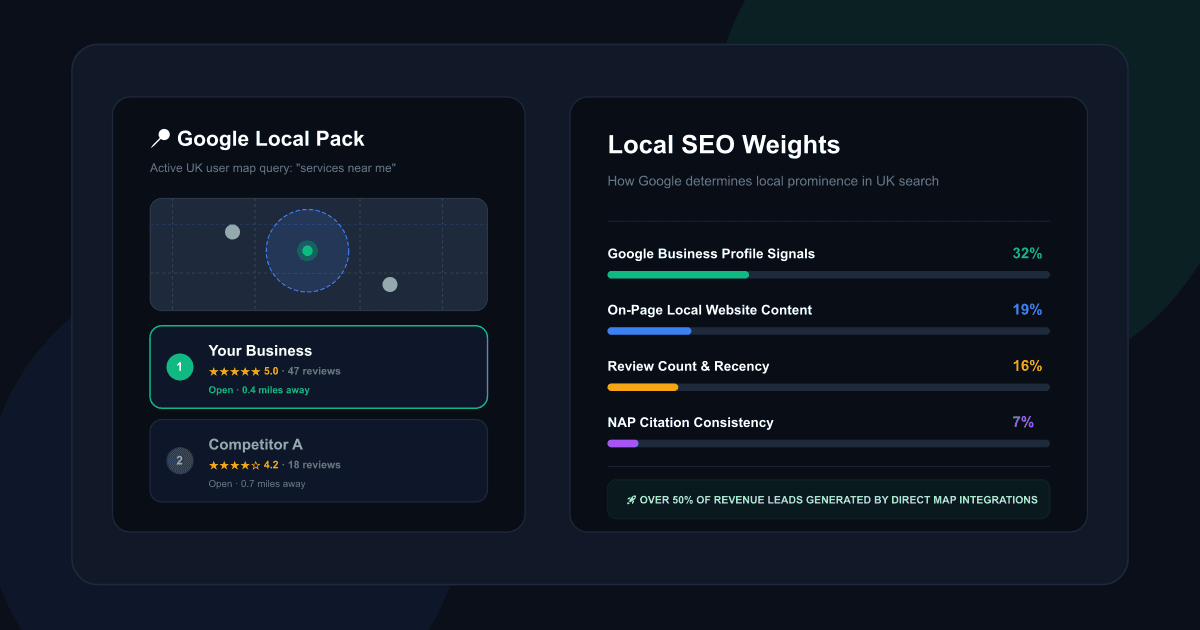
The Local Pack — the block of three businesses shown with a map at the top of local search results — is where the majority of clicks go. Getting into it transforms local search performance.
Your Business Name
Competitor A
High-Impact Placement
The Local Pack captures a major share of local-search attention. For many service searches, appearing in the top three map results can be the difference between being seen and being ignored.
What Google Weights in Local Rankings
Research into local SEO ranking factors in 2026 gives us a reasonably precise breakdown of what moves the needle. This table guides where to spend your time:
| Ranking Factor | Weight | What it means practically |
|---|---|---|
| Google Business Profile signals | 32% | Completeness, category selection, activity, keyword usage in profile |
| On-page website signals | 19% | NAP on site, local keywords, service pages, domain authority |
| Review signals | 16% | Review count, recency, rating, diversity of platforms, owner responses |
| Link signals | 15% | Inbound links from local sites, directory links, anchor text |
| Behavioural signals | 8% | Click-through rate, calls from Maps, dwell time on site |
| Citation signals | 7% | NAP consistency across Yell, Thomson Local, Bing Places, industry dirs |
| Personalisation signals | 3% | Searcher's location history and previous behaviour |
The implication is clear: Google Business Profile and your website together account for over half of all ranking weight. Start there.
Claim and Fully Optimise Your Google Business Profile
Your Google Business Profile (GBP) is the single most important local SEO asset you have. It is what powers your appearance in the Local Pack, Google Maps, and the knowledge panel when someone searches your business name directly. For most local businesses, it is seen by more potential customers than your actual website.
Despite this, the majority of UK small business profiles are either unclaimed, incomplete, or last updated years ago. This is a significant competitive advantage waiting to be captured.
How to set it up properly
Go to business.google.com, search for your business, and claim it. If it does not exist, create it. Verification typically takes 3–5 days via postcard or phone — do not skip this step, as unverified profiles have severely limited visibility.
Once verified, complete every single field:
- Business name — use your exact legal/trading name. Do not add keywords ("Plumber London" instead of "Smith Plumbing") — this violates Google's guidelines and can result in suspension.
- Primary category — the single most important ranking signal in your profile. Choose the category that most precisely matches your main service. If you are a dentist, choose "Dentist" not "Health Professional."
- Additional categories — add up to 9 secondary categories for services you also offer.
- Business description — 250–750 characters. Include your primary service, location, and 2–3 key differentiators. Naturally include the phrase your ideal customer would search for.
- Services — list every service individually with descriptions. This is how Google determines relevance for specific service searches.
- Opening hours — keep these accurate and update them for bank holidays. Incorrect hours are one of the top causes of negative reviews.
- Phone number — use a local UK number if possible (beginning 020, 0161, etc.) rather than an 0800 or mobile-only number.
- Website URL — link to your homepage, or to a specific service page if the profile is for a single service location.
- Photos — minimum 10 photos: your business exterior, interior, team members, and work samples. Profiles with photos get 31% more website clicks and 42% more direction requests than those without.
7× more clicks for fully completed GBP listings vs incomplete ones. A fully populated, verified profile appears 80% more often in search and generates 4× more website visits.
Ongoing: post regularly, respond to everything
Google treats your GBP as a live channel, not a static listing. Profiles that post weekly updates show 34% higher engagement than those posting monthly. Use the "What's New" post type to announce new services, highlight case studies, or answer frequently asked questions. These posts stay live for 7 days and signal active business operation to Google's algorithm.
Make sure your phone number, website form, WhatsApp link, or booking link is clearly visible on your profile and website. Google no longer offers Business Profile chat, so your own contact routes need to be fast, clear, and easy to use.
- Claim and verify your profile at business.google.com
- Complete all fields including services and description
- Upload at least 10 real photos of your business
- Set up weekly posting as a calendar reminder
- Ensure your direct contact routes (phone, forms, booking link) are prominent and fast to reply to
Build and Manage Your Google Reviews
Reviews are the second most heavily weighted local ranking factor — and they are also the primary trust signal for new customers deciding whether to choose you over a competitor. Eighty-seven percent of UK consumers read Google reviews before making a decision. A business with more, more recent, and better-responded reviews will outrank and out-convert one with fewer.
Recency Matters As Much As Quantity
73% of consumers only trust reviews written in the last month. A burst of reviews from 18 months ago is worth less than a consistent flow of new ones.
How to get more reviews without breaking Google's rules
Google prohibits incentivised reviews (offering discounts or free services in exchange for a review) — violations can result in suspension. What you can do is make asking easy and systematic:
- Generate your direct Google review link: go to your GBP dashboard, click "Get more reviews," and copy the URL. Share this with customers directly rather than asking them to find your profile.
- Ask at the moment of highest satisfaction — for a service business, that is immediately after you have delivered great work, not a week later when the moment has passed.
- Add the review link to your email signature, order confirmation emails, and receipts.
- Create a simple QR code linking to your review page for physical locations — print it on business cards, receipts, or a small counter card.
- Set a goal: ask every customer, every time. Even if 10% comply, the compound effect over months is significant.
Responding to reviews — every single one
Responding to reviews signals active business engagement to Google and builds trust with prospective customers reading your profile. Respond to every positive review with a personalised thank-you (not a copy-pasted template). For negative reviews, respond within 24 hours, acknowledge the experience without being defensive, and offer a resolution path. Google's AI in 2026 now summarises your review responses for searchers — a pattern of professional, empathetic responses actively improves your perceived trustworthiness in AI-generated search summaries.
"Local SEO is not about tricking Google. It's about making your business easier to find, easier to verify, and easier to choose. The businesses that win locally are the ones Google can trust — not the ones that have the cleverest tactics."
NAP Consistency — Your Name, Address, and Phone Everywhere
NAP stands for Name, Address, and Phone number. These three data points must be identical across every online listing where your business appears — your website, Google Business Profile, Yell, Bing Places, Apple Maps, Thomson Local, Facebook, and any industry-specific directories.
Why? Google cross-references your business information across the web to verify that you are a real, consistent, trustworthy business. Discrepancies — "Ltd" versus "Limited," "Street" versus "St," different phone formats — introduce doubt into that verification process and reduce your prominence score.
62% of consumers say they would avoid a business if they found incorrect information online. Inconsistent NAP does not just hurt your rankings — it directly costs you customers who find conflicting details and go elsewhere.
How to audit and fix your NAP consistency
- Decide on your canonical NAP — the exact format you will use everywhere. Write it down. For example: "AMK Coding, 15 Example Street, London, EC1A 1BB • 020 7123 4567".
- Search for your business name on Google and check every listing that appears in the first two pages.
- Check your profile on: Yell, Thomson Local, Bing Places, Apple Maps, Trustpilot, Companies House (for Ltd companies), and any trade directory in your sector.
- Update every discrepancy to match your canonical NAP exactly — including spacing, punctuation, and abbreviations.
- Add your full address including postcode to your website footer and Contact page. This on-page NAP is a direct on-page local SEO signal. If you want to verify your business's on-page local SEO and directory standing, you can book a free website and SEO audit to map out your opportunities.
Optimise Your Website for Local Keywords
Your website is the second most important local SEO asset after your Google Business Profile — and it is where you have the most control. On-page signals account for 19% of local ranking weight, which means a well-structured website with the right local content can meaningfully shift your visibility for location-based searches. At AMK Coding, we build local SEO-ready website design tailored to rank, convert, and capture nearby customers from day one.
The keyword formula for local businesses
For local search, your target keyword structure is almost always: [service] + [location]. "Accountant London," "web designer Manchester," "physio near Canary Wharf." These service-plus-location phrases have high purchase intent — the person searching is actively looking to hire, not browsing. They are far more valuable than high-volume generic terms you can never compete for.
Use Google's own autocomplete to find exactly what people in your area are searching. Type "[your service] + [your area]" into Google and look at the dropdown suggestions — those are the exact phrases real people search most often. Note them all down and incorporate them naturally into your content.
What to optimise on your website
- Meta title of your homepage — "[Primary Service] in [Location] | [Business Name]". E.g. "Private GP Appointments in London | Harley Street Clinic".
- H1 heading — include your primary service and location. This is often the first text Google reads when indexing the page.
- Opening paragraph — mention your service and location within the first 100 words. Write naturally — do not stuff keywords.
- Individual service pages — one page per major service, each with its own title, heading, and content optimised for that specific service. A single "Services" page listing everything cannot rank for individual service searches.
- Contact page — include your full address with postcode, phone number, and a Google Maps embed of your location.
- Footer — include your NAP exactly matching your GBP listing.
- Location-specific content — if you serve multiple areas, create a short paragraph or dedicated page for each. "We serve clients across North London, including Islington, Hackney, and Camden." This is how you appear in searches from each area. For example, we run dedicated pages for web design in Brighton and web design in London.
Add LocalBusiness Schema Markup to Your Homepage
Schema markup is structured data embedded in your website's code that tells Google exactly what kind of business you are, where you are, and what you offer. It does not directly change what visitors see — but it dramatically improves how clearly Google understands your business, which feeds directly into Local Pack eligibility and rich result features.
For a UK small business, the LocalBusiness schema type (or a more specific subtype like Plumber, Dentist, LegalService, or MedicalClinic) should be added to your homepage's <head> section as a JSON-LD block.
A minimal LocalBusiness schema example
{
  "@context": "https://schema.org",
  "@type": "LocalBusiness",    // Or more specific: "Plumber", "Accountant" etc.
  "name": "[Your Business Name]",
  "url": "https://yourbusiness.co.uk",
  "telephone": "+44-20-XXXX-XXXX",
  "address": {
    "@type": "PostalAddress",
    "streetAddress": "123 Your Street",
    "addressLocality": "London",
    "postalCode": "EC1A 1BB",
    "addressCountry": "GB"
  },
  "openingHoursSpecification": [{
    "@type": "OpeningHoursSpecification",
    "dayOfWeek": ["Monday", "Tuesday", "Wednesday",
                    "Thursday", "Friday"],
    "opens": "09:00",
    "closes": "18:00"
  }],
  "geo": {
    "@type": "GeoCoordinates",
    "latitude": 51.5194,    // Your exact coordinates from Google Maps
    "longitude": -0.1270
  },
  "areaServed": "London",
  "priceRange": "££"
}
To verify your schema is implemented correctly, paste your URL into Google's Rich Results Test (search.google.com/test/rich-results). It will tell you whether Google can read your structured data and whether it qualifies for rich result features in search.
Set Up Google Search Console and Track What's Working
Everything in this guide should be measured. Without data, you are guessing which actions are working and which are not. Google Search Console (free) tells you exactly which search queries are sending people to your site, which pages are ranking, and whether Google is indexing everything correctly. Google Business Profile Insights shows you how customers are finding and interacting with your profile.
Set up Google Search Console
- Go to search.google.com/search-console and sign in with a Google account
- Add your website as a property and verify ownership (simplest method: add an HTML tag to your website's <head>, or use the Google Analytics verification method if GA is already installed)
- Submit your XML sitemap — your sitemap URL is typically yourdomain.co.uk/sitemap.xml on WordPress, or automatically generated on Next.js
- Check the "Coverage" report — any pages marked as "Error" or "Excluded" need investigation
- Check the "Performance" report after 2–3 weeks — it shows which queries are generating impressions and clicks, which is your most valuable keyword research tool
Monthly review routine
Once a month, spend 20 minutes checking: which queries are growing in impressions (double down on those topics), which pages have high impressions but low click-through rate (your meta titles may need rewriting), and whether any new crawl errors have appeared. This 20-minute habit, maintained consistently, will do more for your long-term local visibility than any one-off tactic.
Building Long-Term Local Authority with Content
The steps above establish your local SEO foundation. To build on it over time — to rank for more searches, attract more visibility, and compound your authority — you need content that serves your local audience specifically.
For most UK small businesses, this means one blog post or service page per month, targeted at a specific question or search your ideal customers have. Not generic content — locally relevant content. Not "how to fix a boiler" (national competition, impossible to rank) but "how much does a new boiler cost in London in 2026?" (local intent, achievable for a London plumber).
The local content formula
- Answer a specific local question — start with "People also ask" on Google for your service + location, and write a page for each question
- Include your location throughout — naturally, as you would speak: "In London, most homeowners we work with..." not keyword-stuffed repetition
- Aim for 800–1,500 words — enough to genuinely answer the question, not padded for length
- Include an FAQ section at the bottom targeting related questions Google shows in "People also ask"
- Add FAQ schema markup to your FAQ sections — they can generate rich result expandable items directly in search results
- Link internally — from your blog posts to your service pages, and between related posts
Your Local SEO Priority Checklist
Use this as your implementation roadmap. Work through it in order — each step builds on the last.
| Priority | Action | Effort | Time to see results |
|---|---|---|---|
| 1 — Critical | Claim and fully complete Google Business Profile | 2–3 hours | 2–4 weeks |
| 2 — Critical | Generate review link and email last 20 customers | 30 minutes | Immediate |
| 3 — Critical | Add full NAP to website footer and contact page | 15 minutes | 2–4 weeks |
| 4 — High | Rewrite homepage meta title and H1 with service + location | 30 minutes | 4–8 weeks |
| 5 — High | Add LocalBusiness JSON-LD schema to homepage | 1 hour | 4–8 weeks |
| 6 — High | Set up Google Search Console and submit sitemap | 1 hour | Ongoing |
| 7 — Medium | Audit and fix NAP consistency across Yell, Bing, Apple Maps | 2–3 hours | 4–12 weeks |
| 8 — Medium | Create individual pages for each major service | 1 day | 2–4 months |
| 9 — Ongoing | Post weekly to GBP and respond to all reviews | 30 min/week | Compounding |
| 10 — Ongoing | Publish one local-intent blog post per month | 2–3 hrs/month | Compounding |
Frequently Asked Questions
How long does local SEO take to work for a UK small business?+
Is local SEO free for UK small businesses?+
What is the Google Local Pack and how do I get into it?+
How many Google reviews do I need to rank locally in the UK?+
Can I do local SEO myself, or do I need an agency?+
Sources & Official Guidelines
- Google Business Profile Help — local ranking factors: relevance, distance, and prominence.
- Google Business Profile Help — Business Profile posts, updates, offers and events.
- Google Maps Policy — prohibited and restricted review content (prohibits incentivised reviews).
- BrightLocal — Local Consumer Review Survey.
- Whitespark — Local Search Ranking Factors Study.
Want Us to Handle Your Local SEO?
We build local SEO into every website we deliver — schema markup, service page structure, Google Business Profile optimisation, and technical foundations that give your business the best possible chance of ranking in the Local Pack. Book a free audit and we'll tell you exactly where you stand right now.
AMK Coding • Brighton-based, serving London & the UK • Next.js & WordPress • Local SEO built in as standard
AMK Coding
AMK Coding (trading as PEOPLELY LTD) is a Brighton-based web development agency serving London and the UK. We build local SEO foundations into every website we deliver — schema markup, location-specific page structures, and Google Business Profile optimisation are standard on all our builds, not optional extras.